
Loops
Loops are a fundamental control structure in C++ that allow you to repeat actions
efficiently based on a condition. Whether you need to iterate while a condition is
true, ensure a block of code runs at least once, or repeat a set number of times,
loops provide the flexibility to handle various scenarios. In this section, we’ll
explore three common types of loops: while, do-while, and for.
While Loops
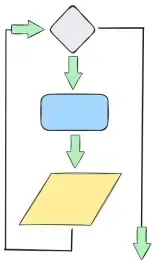
Section titled “While Loops”A while loop evaluates its condition at the top of the loop, before executing the body.
If the condition evaluates to true, the loop continues executing the body repeatedly.
Once the condition becomes false, the loop is skipped, and the program moves on to the
commands that follow. This makes while loops ideal for situations where the number of
iterations depends on a dynamic condition rather than a fixed count.
Syntax
Section titled “Syntax”The basic syntax of a while loop in C++ is as follows:
while (condition) { // Body of the loop}Key Points
Section titled “Key Points”-
No Semicolon: The
whilestatement should not end with a semicolon after the condition. Adding one will result in a syntax error or unintended behavior. -
Scope: Variables declared inside the loop block are local to that block and cannot be accessed outside of it. For example:
while (condition) { int x = 10; // 'x' is only accessible within this block}// x is no longer accessible hereUse Case
Section titled “Use Case”The following is an example of a use case for a while loop:
-
Asks the user to enter a number that represents where to start a countdown from.
-
The user’s number is used in a
whileloop condition to check that it is greater than 0. -
The current number is logged to the terminal and then decremented.
-
After the
whileloop finishes, a message is logged to signal the end of the countdown.
// Copyright 2024 CSCE240#include <iostream>
using std::cin;using std::cout;using std::endl;
int main() {  cout << "Enter an integer to countdown from:" << endl;  int countdown;  cin >> countdown;
  while (countdown > 0) {    cout << countdown << endl;    --countdown;  }
  cout << "Lift Off!!!" << endl;
return 0;}cpplint driver.ccDone processing driver.ccg++ -Wall -std=c++17 driver.cc./a.outEnter an integer to countdown from:554321Lift Off!!!Do-While Loops
Section titled “Do-While Loops”A do-while loop evaluates its condition at the bottom of the loop, ensuring that the body of the
loop is executed at least once, regardless of the condition. If the condition evaluates to true,
the loop continues executing. Once the condition becomes false, the loop terminates, and the program
proceeds with the commands that follow. This structure is particularly useful when the loop’s
body must run at least once before checking the condition.
Syntax
Section titled “Syntax”The basic syntax of a do-while loop in C++ is as follows:
do { // Body of the loop} while (condition);Key Point
Section titled “Key Point”- Semicolon: Unlike other loops, a
do-whileloop requires a semicolon (;) at the end of thewhilestatement. Omitting it will result in a syntax error.
This structure ensures that the loop is executed at least once, with clear rules for writing valid and readable do-while loops.
Use Case
Section titled “Use Case”A do-while loop is particularly useful in scenarios where user input must be validated, and the program requires the input to be
processed at least once before rechecking the condition. For example:
// Copyright 2024 CSCE240#include <iostream>using std::cin;using std::cout;using std::endl;
int main() {  int number;  do {    cout << "Enter a number between 1 and 10:" << endl;    cin >> number;  } while (number < 1 || number > 10);
cout << "You entered: " << number << endl; return 0;}cpplint driver.ccDone processing driver.ccg++ -Wall -std=c++17 driver.cc./a.outEnter a number between 1 and 10:0Enter a number between 1 and 10:11Enter a number between 1 and 10:5You entered: 5For Loops
Section titled “For Loops”A for loop is a concise way to write counter-controlled loops in C++.
It is particularly useful when the number of iterations is known before
the loop begins. By combining the initialization, condition, and update
in a single line, for loops make the code cleaner and easier to read
compared to while or do-while loops in such scenarios.
Syntax
Section titled “Syntax”The basic syntax of a for loop in C++ is as follows:
for (initialization; condition; update) { // Body of the loop}Key Points
Section titled “Key Points”-
No Semicolon: The
forstatement does not end with a semicolon after the parenthesis. Adding one will cause errors or unintended behavior. -
Braces: Braces
{}are optional if the body of the loop contains only a single statement. However, using braces is recommended for readability and to avoid errors when modifying the loop.
for (int i = 0; i < 5; ++i) statement; // No braces needed for a single line- Local Scope: Variables declared in the parenthesis are local to the loop block and cannot be accessed outside of it. For example:
for (int i = 0; i < 5; ++i) { std::cout << i << std::endl; // 'i' is accessible here}// std::cout << i; // Error: 'i' is not accessible hereUse Case
Section titled “Use Case”A classic example of when to use a for loop is the FizzBuzz algorithmic
problem.
Requirements
Section titled “Requirements”Write a loop that prints all numbers from 1 to 30 except for the following cases:
-
If a number is divisible by 3, print
Fizz -
If a number is divisible by 5 and not by 3, print
Buzz -
If a number is divisible by 3 and 5, print
FizzBuzz
// Copyright 2024 CSCE240#include <iostream>using std::cout;using std::endl;
int main() {  const int kCount = 30;
  for (int i = 1; i <= kCount; ++i) {    if (i % 3 == 0 && i % 5 == 0) {      cout << "FizzBuzz" << endl;    } else if (i % 5 == 0) {      cout << "Buzz" << endl;    } else if (i % 3 == 0) {      cout << "Fizz" << endl;    } else {      cout << i << endl;    }  }
return 0;}cpplint driver.ccDone processing driver.ccg++ -Wall -std=c++17 driver.cc./a.out12Fizz4BuzzFizz78FizzBuzz11Fizz1314FizzBuzz1617Fizz19BuzzFizz2223FizzBuzz26Fizz2829FizzBuzzBreak And Continue
Section titled “Break And Continue”The break and continue commands are used to control the flow of loops in specific ways:
break: Immediately exits the current loop or code block, skipping any remaining iterations or commands. It is often used to terminate a loop when a specific condition is met.
The following code is an algorithm to find the Least Common Multiple of two numbers within a Max Range:
// Copyright 2024 CSCE240#include <iostream>using std::cout;using std::endl;
int main() {  // Lowest Common Multiples of x and y using a max range of kRange  const int kRange = 100;  int x = 4, y = 5;  // Assume no Least Common Multiple exists  int lcm = 0;  // Make looping faster by iterating by the max amount instead of 1  // Used for demonstration in case you didn't know x and y  int max = x > y ? x : y;
  // Start at the max value and increment by the max value  for (int i = max; i <= kRange; i += max) {    if (i % x == 0 && i % y == 0) {      lcm = i;      break;    }  }
if (lcm == 0) { cout << "No Least Common Multiple found for " << x << " and " << y << " in a max range of " << kRange << "." << endl; } else { cout << "The Least Common Multiple for " << x << " and " << y << " is " << lcm << "." << endl; }}cpplint driver.ccDone processing driver.ccg++ -Wall -std=c++17 driver.cc./a.outThe Least Common Multiple for 4 and 5 is 20.continue: Skips the remaining commands in the body of the loop and moves directly to the next iteration. This is useful when you want to bypass certain parts of the loop for specific cases without exiting the loop entirely.
The following snippet prints odd numbers within a range:
// Copyright 2024 CSCE240#include <iostream>using std::cout;using std::endl;
int main() {  // Print only odd numbers  const int kRange = 10;
for (int i = 1; i <= kRange; ++i) { if (i % 2 == 0) { continue; } else { cout << i << endl; } }}cpplint driver.ccDone processing driver.ccg++ -Wall -std=c++17 driver.cc./a.out13579Style Requirements
Section titled “Style Requirements”A list of general style requirements for do-while loops, for loops, and while loops
can be found in the control structures page.